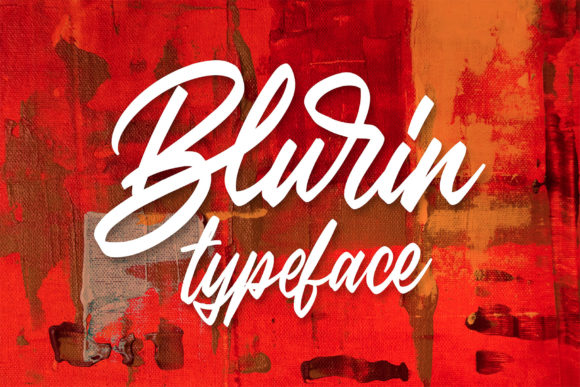
Blurin: A Handwritten Font for Modern Web Design
As a web designer, I’m always on the lookout for fonts that can bring a unique and modern touch to my projects. Recently, I stumbled upon Blurin, a gorgeous handwritten font that has quickly become a top choice for many of my web design needs. In this review, I’ll share my experience with Blurin and how it can elevate your digital designs.
Visual Personality and Style
Blurin is a premium font that beautifully blends classic calligraphic influences with a contemporary and fresh feel. Its elegant, flowing lines and subtle variations make it a standout choice for any project that requires a touch of sophistication and creativity. The font’s personality is both charming and versatile, making it suitable for a wide range of web design applications.
Testing Blurin in Real Web Layouts
When I first tested Blurin in a real website layout, I was immediately impressed by its visual appeal. I used it in the hero section of a boutique online store, where it added a luxurious and inviting feel to the page. The font’s readability on larger headings and titles was excellent, even on mobile screens, which is crucial for maintaining a seamless user experience.
For a more practical example, I also incorporated Blurin into a coaching website. The font worked beautifully for the main heading and subheadings, creating a welcoming and professional atmosphere. The client loved how it made their brand stand out and felt it perfectly captured the essence of their business.
Readability and Responsive Design
One of the key aspects of using Blurin in web design is its readability. While it shines in larger sizes, such as in headers and hero sections, it may not be the best choice for long body text or small navigation labels. For these, I recommend pairing Blurin with a clean sans serif font like Roboto or Lato. This combination ensures that the overall design remains visually appealing and functional across all devices.
In terms of responsive design, Blurin performs well. It scales nicely on different screen sizes, maintaining its elegance and legibility. However, it’s important to test the font on various devices and screen resolutions to ensure it looks great everywhere. I found that adjusting the line height and letter spacing slightly helped in achieving a perfect balance.
Web Design Applications
Blurin is incredibly versatile and can be used in a variety of web design elements:
- Website Headers and Hero Sections: Perfect for creating a strong first impression and setting the tone for the entire site.
- Landing Pages and Call-to-Action Areas: Adds a touch of elegance and professionalism, making CTAs more compelling.
- Online Shop Banners and Product Descriptions: Enhances the visual appeal of product pages, making them more engaging and attractive.
- Blog Graphics and Social Media Posts: Ideal for adding a creative and personal touch to blog headers and social media graphics.
- Course Pages and Educational Content: Can be used for titles and headings to make educational content more inviting and accessible.
Font Pairing and Webfont Availability
When using Blurin in web design, it’s essential to consider font pairing. As mentioned earlier, a clean sans serif font works well for body text and smaller elements. For a more editorial and sophisticated look, you might pair Blurin with a simple serif font like Merriweather.
Before integrating Blurin into your web projects, make sure to check its webfont availability. Most premium fonts, including Blurin, come with webfont formats (WOFF, WOFF2, EOT) that are optimized for web use. Additionally, verify the included styles, alternates, ligatures, and multilingual support to ensure it meets your project’s requirements.
Conclusion
In summary, Blurin is a fantastic handwritten font that brings a unique and modern touch to web design. Its elegant and versatile style makes it a top choice for website headers, hero sections, landing pages, and more. By carefully considering its readability, responsive design, and font pairing, you can create stunning and effective web experiences. Give Blurin a try and see how it can elevate your next web project.